NewWhat's new in 0.3.0

An IDE-grade Git diff viewer for Mac, without the IDE.

DiffCode is a lightweight, native Git client for macOS. Review every change side by side — yours, your teammates' or your coding agent's — and commit exactly the lines you mean, in about 30–50 MB of memory.

  • Free and open source
  • macOS 14 or later
  • Apple Silicon
  • Updates itself
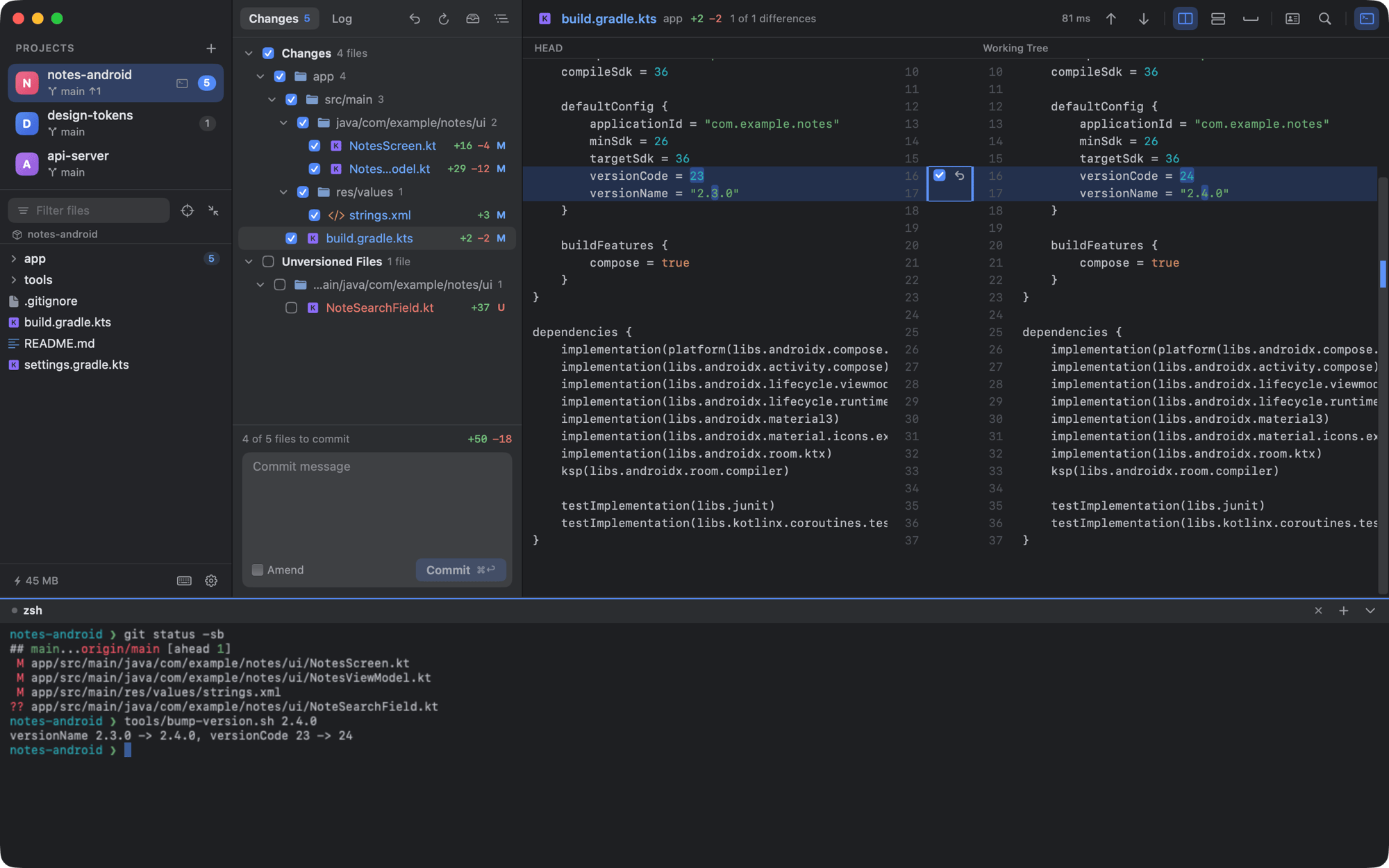
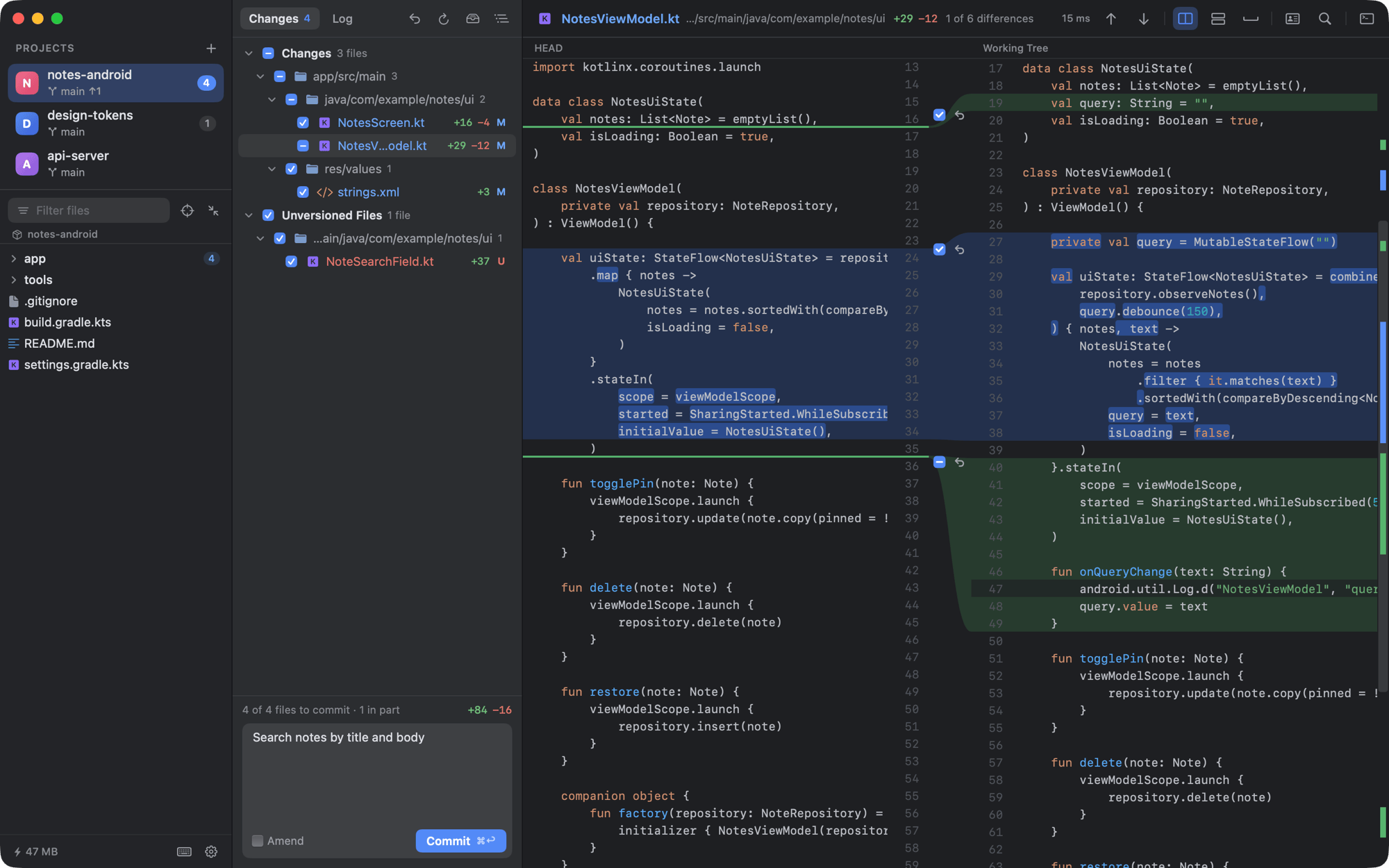
DiffCode, a Git diff viewer for Mac, showing a side-by-side diff of a Kotlin file with one line left out of the commit
The whole installer

4MB

Small enough to just try.

IDE installers often run to a gigabyte or more. DiffCode's installer is about 4 MB, with no account and nothing to set up: download it, open a repository, and if it isn't for you, drag it to the Trash.

Why DiffCode

Your IDE can show a Git diff. It's just heavy.

Opening an IDE to see what changed also starts code completion, builds, indexing and a pile of plugins: a long wait and several gigabytes of memory. With coding agents and teammates writing more of the code, you review changes all day. DiffCode is the lightweight option: it keeps only the part you came for — the Git diff, the commit and the history.

Your IDE−6
  • −Code completion
  • −Compiler and builds
  • −Indexing
  • −Plugins
  • −Debugger
  • −Several gigabytes of memory
DiffCode+6
  • +A side-by-side diff you can edit
  • +Commits down to single lines
  • +Git history and the commit graph
  • +A terminal for your coding agents
  • +Search across every repository
  • +About 30–50 MB of memory
30–50MBof memory in everyday use
40msto open a 30,000-line diff
0writes to your repository until you act
Features

Everything a code review needs. Nothing it doesn't.

DiffCode is a Git diff viewer first and a Git client second. Every feature is about reading a change, deciding what to keep and committing it.

Partial commits

Commit only the lines you choose.

Untick a hunk, or select a few lines and leave them out. Only the rest is committed; what you left out stays in your working tree for the next commit.

  • Amend or undo the last commit; ⌥⌘K commits and pushes.
  • Git hooks run as usual, and their output is shown when they fail.
  • Roll back a file or a single change. ⌘Z brings it back.
Made for coding agents

See what your coding agent changed.

Run Claude Code, Codex or any command-line agent in the built-in terminal. Every file it touches shows up in the diff above as it works: fix a line, roll back what you don't want, commit what you approve.

The built-in terminal in DiffCode running a script while the Git diff above updates
Git history

Branches and history, one click away.

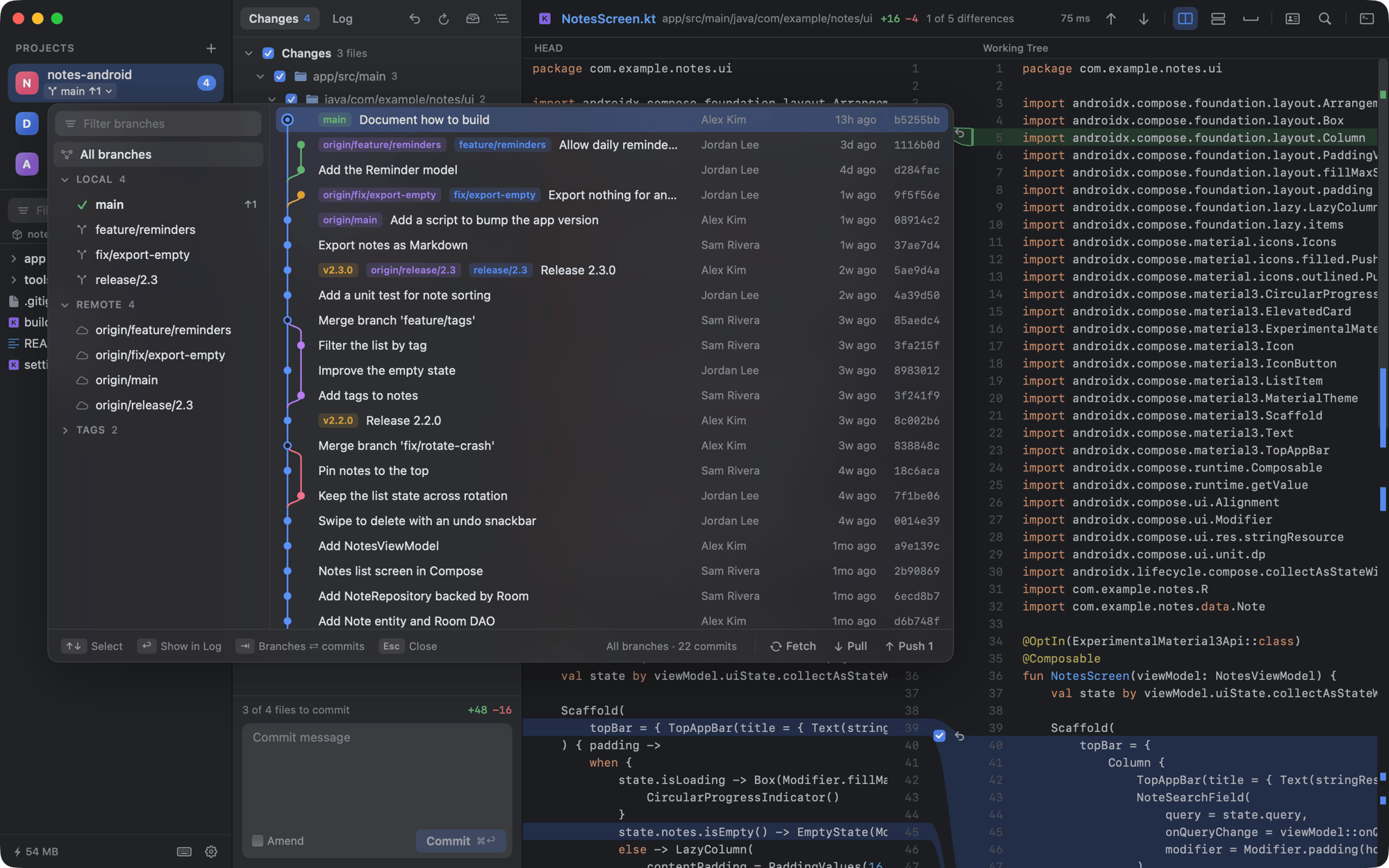
Click the branch name for the Git graph in a dropdown — branches, tags and remotes on the left, commits on the right. Check out, merge, rebase, cherry-pick, revert or reset, each with Undo.

The Git graph dropdown in DiffCode with branches, tags and the commit graph
Merge conflicts

Resolve merge conflicts one at a time.

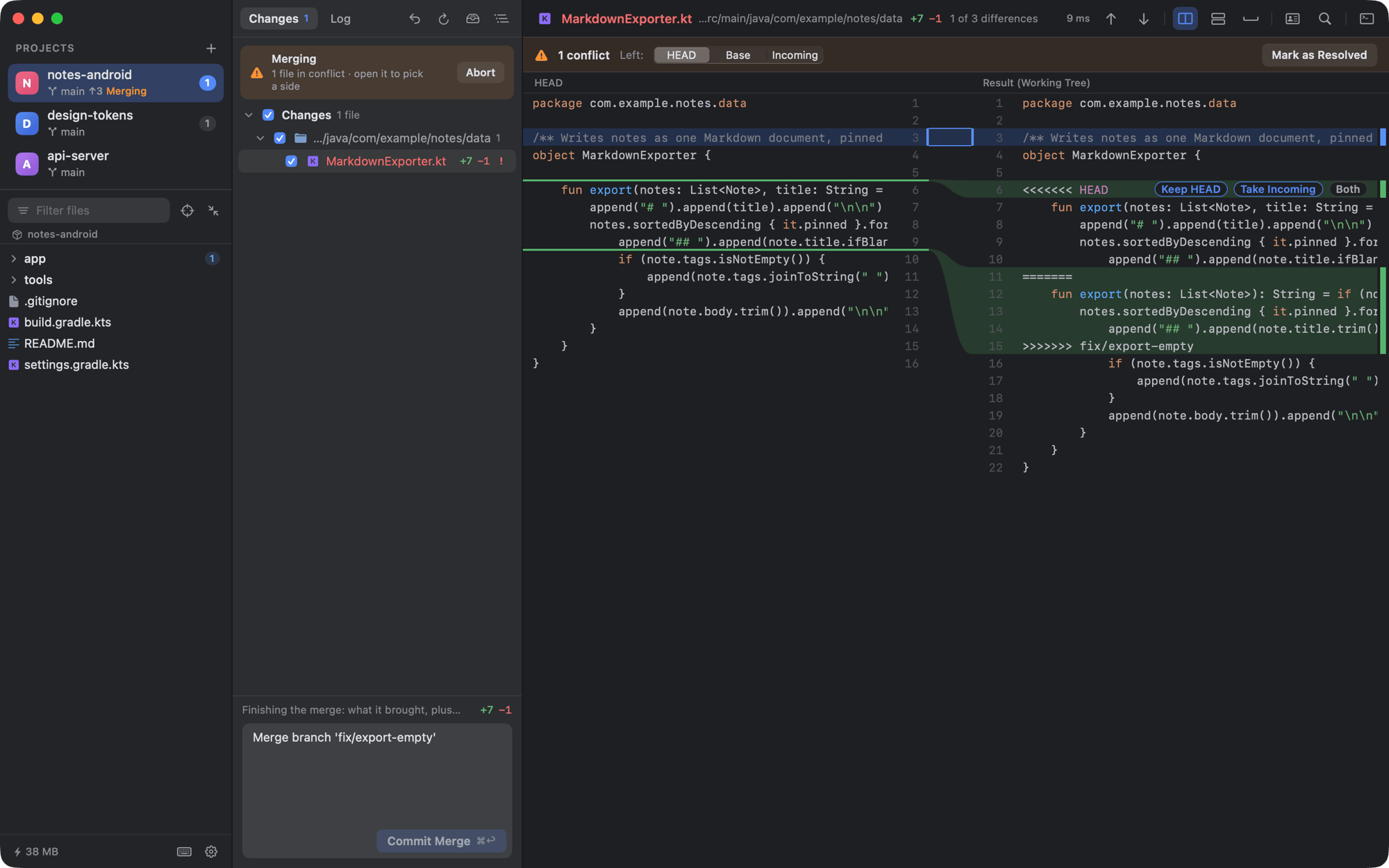
Every conflict gets Keep HEAD, Take Incoming and Both. A banner keeps the merge or rebase in view, with Continue, Skip and Abort, and Commit Merge when you are done.

Resolving a Git merge conflict in DiffCode with Keep HEAD, Take Incoming and Both
All your repositories

Every repository in one window.

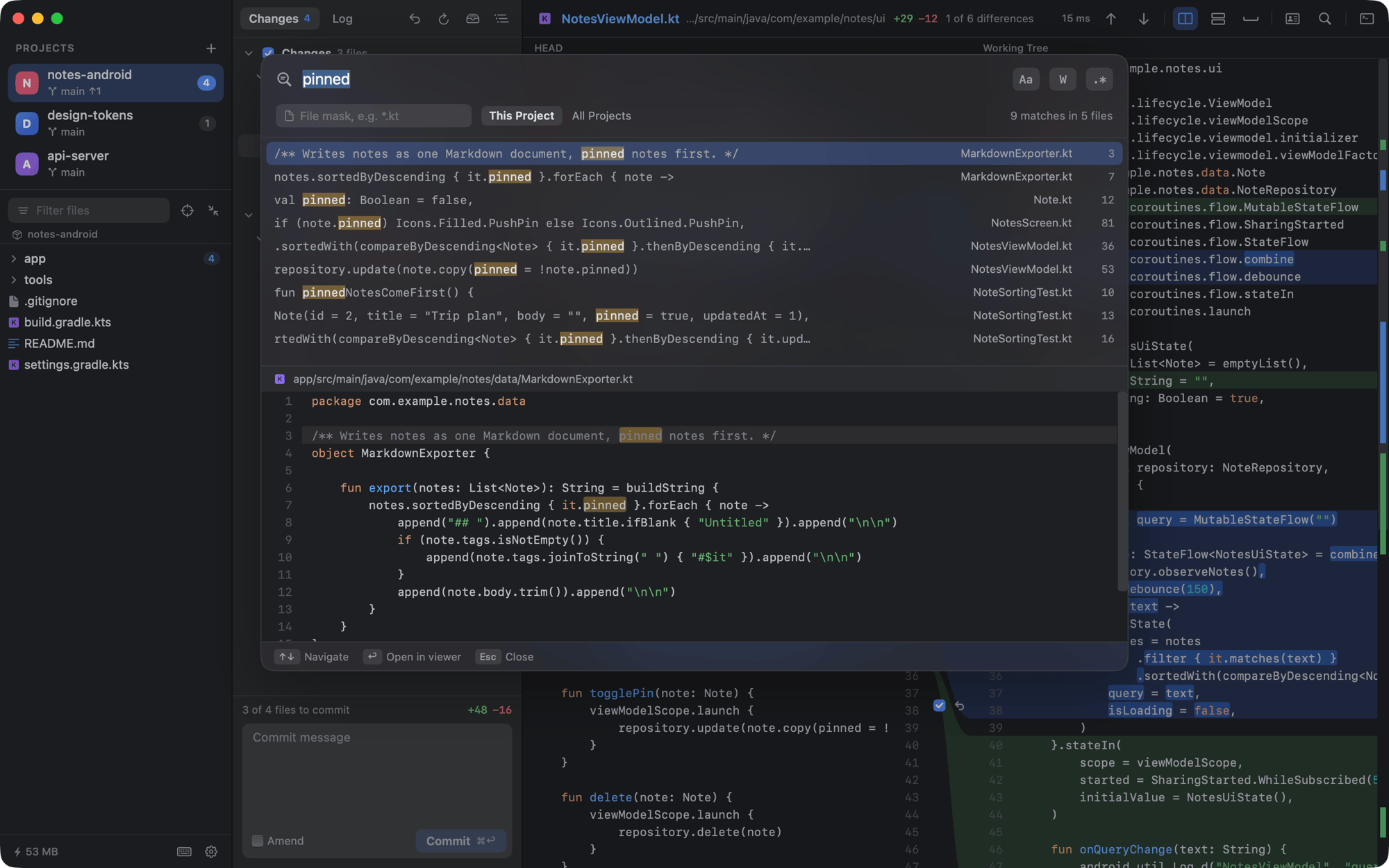
The sidebar lists your projects with branch, ahead and behind, and change counts. Search Everywhere with ⇧⇧, go to a file with camel-case matching, or find in files across every project with git grep.

Find in Files across Git repositories in DiffCode, with a result list and a preview
Details

The details of a good diff viewer.

Edit in place

Type into the working-tree side of the diff. It saves after a second of idle and keeps encoding and line endings byte for byte.

Side-by-side or unified diff

Word-level highlights, curved connectors and an overview bar. ⌥⌘V switches between the two views.

Syntax highlighting for your stack

Kotlin, Java, Swift, TypeScript, Python, Go, Rust, C/C++, C#, Dart and more. Image diffs too, and you can ignore whitespace.

Stash

Stash local changes, then apply, pop or drop them from a list. Dropping a stash can be undone.

Open from the terminal

Run dif in a repository, or dif ~/work/app ~/work/lib, to open it in DiffCode. Or drag folders into the sidebar.

Light or dark, English or 中文

Dark, light or follow the system, with separate font sizes for code, interface and terminal. The language follows your Mac.

Keyboard

Your hands stay on the keys.

Every action in DiffCode has a keyboard shortcut. Press ⌘/ in the app to see them all.

F7Next change, then the next file
⌘↩Commit
⌥⌘KCommit and push
⇧⇧Search everywhere
⇧⌘FFind in files
⌥⌘ZRoll back a file or change
⌥⌘BGit graph
⌥⌘THand the file path to your agent
Privacy

Your code stays on your Mac.

No account, no telemetry

DiffCode goes online only when you fetch, pull or push — through your own git, credentials and SSH agent — and to check for updates.

Read-only until you act

Refreshing, diffing and searching never write to your repository or take index.lock, so it can stay open next to your IDE and agents.

Everything can be undone

Rollbacks, deletes and history edits come with Undo. Deleted files go to the Trash, and risky steps ask first.

FAQ

Frequently asked questions

Something else? Ask in GitHub Discussions or open an issue.

Is DiffCode free?

Yes. DiffCode is free and open source under the GNU General Public License v3.0. There is no account, subscription or paid tier, and the source code is on GitHub.

What is DiffCode for?

It is a Git diff viewer and Git client for reviewing and committing changes on a Mac. It shows side-by-side or unified diffs, lets you edit and commit selected lines, and handles branches, history, stash and merge conflicts. It is not a code editor or an IDE.

How is it different from opening my IDE?

An IDE also starts code completion, builds, indexing and plugins, and often takes several gigabytes of memory. DiffCode keeps only the diff, the commit, the history and a terminal, so it opens quickly and uses about 30–50 MB.

How big is DiffCode?

The installer is about 4 MB, and the installed app is about 8 MB. DiffCode is a native AppKit app with no bundled browser engine or runtime, which is also why it starts quickly and uses about 30–50 MB of memory.

Can I review changes made by Claude Code or Codex?

Yes. Run the agent in DiffCode's built-in terminal, or anywhere else, and every file it changes appears in the diff as it works. Compare with Branch shows everything since the agent's branch split off.

Can I commit only part of a file?

Yes. Untick a hunk, or select lines and leave them out of the commit. Those changes stay in your working tree for later.

Does DiffCode change my repository?

Not until you act. Refreshing, diffing and searching never write to the repository or take index.lock, so DiffCode can stay open next to your IDE, terminal and agents.

Which Macs does DiffCode run on?

Apple Silicon Macs running macOS 14 Sonoma or later. Intel Macs are untested. The app is signed and notarized by Apple.

How does DiffCode update?

It checks for updates and installs new versions from inside the app. You can also download the latest release from GitHub at any time.

DiffCode app icon

Download DiffCode for Mac.

Free and open source. Signed and notarized by Apple, and it keeps itself up to date.

Open DiffCode.pkg and follow the installer. macOS 14 Sonoma or later, Apple Silicon.
Release notes · Build from source · All versions